


.png)

We introduced Messages back in spring, a single inbox in the Supplier Portal that brings every customer conversation together with full booking context and AI-suggested replies. If you missed that launch, read the original announcement first.
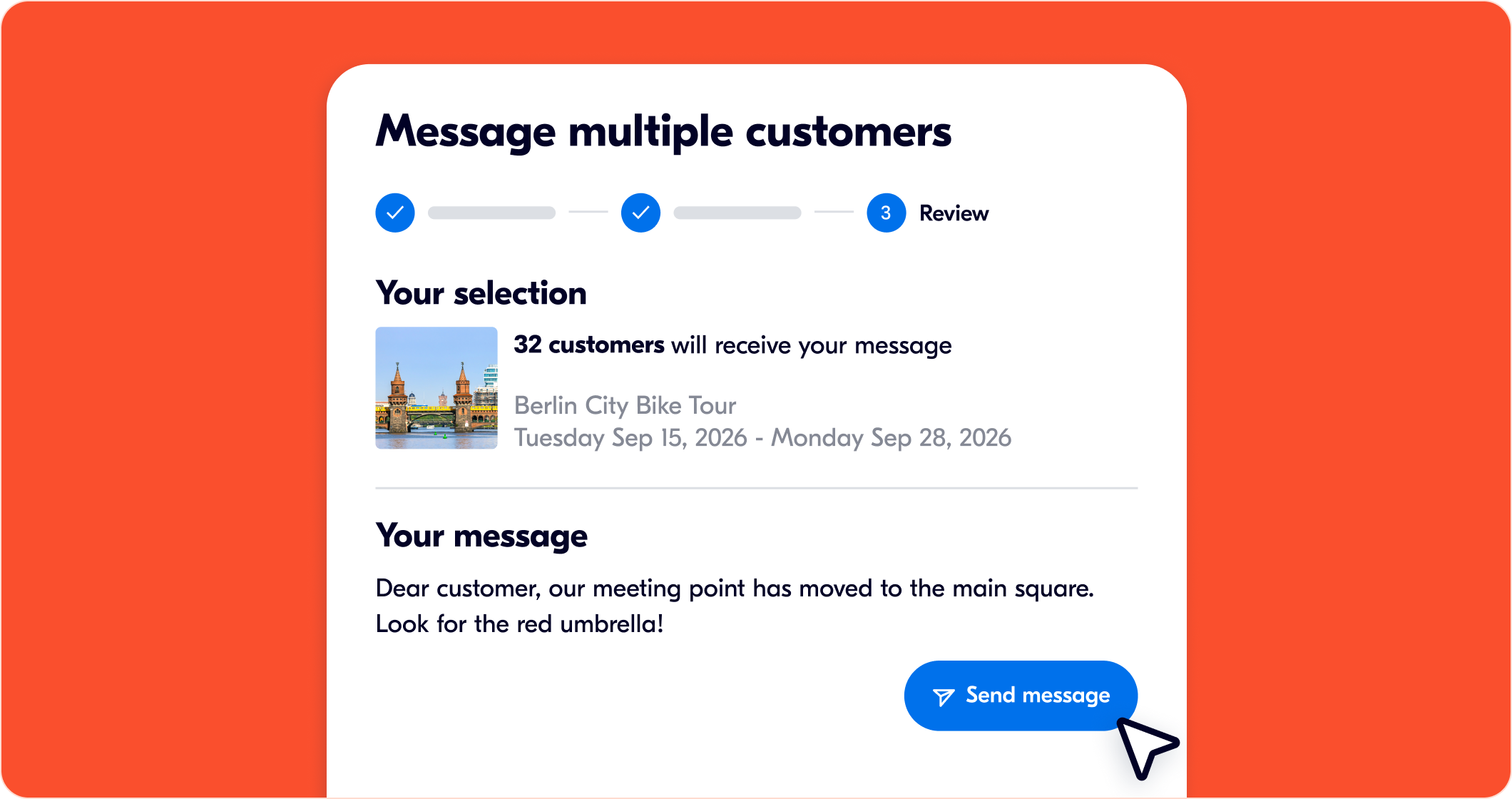
This fall, Messages gets four additions. Message multiple customers now lets you send one message to every traveler booked on the same activity and date from the Bookings tab, instead of writing out the same update booking by booking.
Alongside broadcast, three other changes shipped together: you can attach a photo or file to any message, read receipts show who's opened it, and every message is automatically translated into each traveler's language in their app or email.
Broadcast vs. individual messages
Broadcast is for anything true for every traveler on that departure: a meeting point change, a weather delay, a schedule shift, or a reminder sent the morning of. If the information is the same for the whole group, a broadcast sends it once instead of fifteen times.
Individual messages are still the right tool for anything specific to one booking: a dietary request, a late arrival, or a question only one traveler asked. Mixing the two up in either direction causes problems, a dietary accommodation sent to the whole group is confusing noise, and a schedule change sent booking by booking is slow and easy to miss one person on.
A simple test: if you're about to write the same sentence into more than one booking thread, that's what broadcast is for.
Attachments
Some information is faster to show than describe. A parking map, a photo of the meeting point landmark, a picture of your vehicle so travelers can spot it at pickup, and a PDF voucher—all of these were used to mean a traveler either had to interpret a text description or ask a follow-up question. Now they can go straight into the message as an attachment.
The practical win is fewer clarifying messages. "Look for the guide near the fountain in a red jacket" works. A photo of exactly that scene works faster, and it removes the back-and-forth where a traveler asks "which fountain?"
Try it directly from Bookings → Messages in the Supplier Portal.
.png)
Read receipts
Read receipts solve a specific anxiety: sending a time-sensitive update and not knowing whether it landed. If you broadcast a 20-minute delay two hours before a tour, read receipts tell you, at a glance, who's opened the message and who hasn't.
That's the moment they're actually useful, not for routine updates, but for anything where you need to decide whether a phone call or a second message is worth the effort. Without receipts, you'd either assume everyone saw it (risky) or follow up with everyone regardless (unnecessary). With them, you follow up only where it's needed.
.png)
Automatic translation
Every message is now translated automatically into each traveler's preferred language, whatever that's set to in their app or booking. You write the message once, in whatever language is natural for you, and each traveler receives it in theirs.
This matters more than it might seem. A traveler who's comfortable booking in English doesn't necessarily want to decode an urgent schedule change in it, especially mid-trip, with a tour about to start. Automatic translation removes that gap without asking you to write (or translate) the same update multiple times.
Combined with attachments and read receipts, this closes a gap that used to be a real operational cost for operators serving multiple source markets: a clear, visual, trackable update that actually lands in the traveler's own language, without you needing to write (or translate) it multiple times.
A realistic scenario, start to finish
A boat tour gets delayed 30 minutes by weather. 15 minutes before departure:
- You send one broadcast to everyone booked on that departure: "Due to weather, departure is delayed by 30 minutes. New departure time: 2:30 PM. We appreciate your patience." Each traveler reads it in their own language automatically.
- You check read receipts five minutes later. Twelve of fourteen travelers have opened it. You call the two who haven't, rather than guessing whether they know about the change.
- The delay also means a new meeting point, so you follow up with a photo of it in individual messages to the two travelers who haven't read the broadcast yet, rather than guessing whether they know about the change. Everyone else already confirmed they saw the update.
That's three fewer problems than the old version of this: writing the update multiple times, hoping a language barrier didn't cause confusion, and not knowing who to chase.
Broadcast, attachments, read receipts, and automatic translation are live now under Bookings and Messages, alongside everything else in this season's release.