



A typo in a title, a sentence that contradicts itself, text that doesn't match your listing's language. None of these seem like a big deal on their own.
But a traveler reading it has to decide, in seconds, whether to trust what they’re seeing. Enough small doubts and they don’t book. Or they book the wrong thing, then cancel.
Travelers book when they understand exactly what they're buying. 59% of Explorers, the travelers behind about 60% of spending on experiences, say detailed activity descriptions are among the most helpful things when they research.
We see it in bookings too. In a recent test we ran across thousands of activities on GetYourGuide, listings with fewer content issues converted better than those with inconsistent content. When something doesn't add up, travelers hesitate, and that hesitation can be enough to lose the booking.
The good news: most of these errors are quick to fix once you know where to look.
What GetYourGuide fixes for you
We now correct small errors across listings automatically. Things like spelling, punctuation, text appearing in a different language than the listing’s main language, and certain types of inconsistent wording. These fixes apply to new listings, and are rolling out across existing activities.
You can see every change in the History section of each product in the Supplier Portal:
- Go to the Performance page and click View details next to a product.
- Scroll down below the options.
- Check the History table.
Automatic fixes only go so far. They catch clear errors, but they can't catch what only you know: a detail that's missing, a meeting point that has moved, or two parts of a listing that say different things.
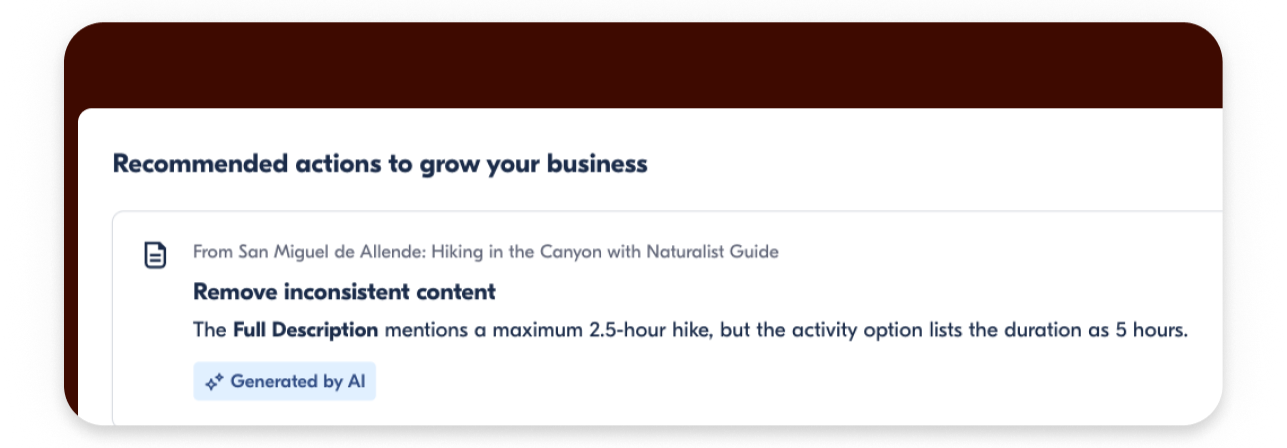
Which is why you’ll also find Recommended Actions alongside the performance data of your products.
What Recommended Actions are
Recommendations Actions are specific suggestions on how you can optimize your products to drive better performance and improve customer satisfaction overall. They cover a range of topics: reviews, availability, special offers, content accuracy, and more.
This article focuses on the content ones, because inaccurate listings are one of the quietest reasons travelers don't book: no complaint, no message, just a hesitation that turns into a lost booking.
Each one points to a specific product and tells you what needs your attention. Some are simple, like a field that's empty or a section that's too short for travelers to decide. Others take more thought, like wording that can be read two ways.
Here's an example. Your inclusions say "2-hour tour with a licensed guide", but your option is set to 3 hours. A traveler reading both has no idea which is right. The Recommended Action shows you the problem so you can fix it in one place.
How to find them
- Go to the Performance page in the supplier portal.
- Scroll down past the Performance by product table.
- Find Recommended actions to grow your business and click Take action on any suggestion.
To see the suggestions for one product only, click View details next to that product, then scroll down below the table.
Recommended read: How to use Recommended Actions
The rest of this article covers what to check yourself, even when you don't have a Recommended Action open.
1. Typos you may not catch
Spelling errors and formatting issues are the most common content problems we see and also the quickest to fix. You've read your listing so many times that your brain fills the gaps. Travelers read it fresh, so they notice.
Where to look:
- Title. Read it out loud. Does it sound natural?
- Short description. This is where typos are most damaging, because it's what travelers read first. Check every word.
- Highlights. These are often written quickly and rarely reviewed after the fact. Look for mixed capital letters and punctuation.
- Full description. Read it in sections and copy and paste your inclusions list and your full description into a document side by side so you can easily spot gaps when they’re next to each other. Errors usually hide in the middle of long paragraphs.
2. Details that don’t match
This is the accuracy issue that does the most damage, because it makes travelers question whether the information is reliable at all.
It also shows up after the booking. In 2024 reviews on GetYourGuide, "not as advertised" was one of the top three complaints for guided tours and for vehicle tours and day trips.
Contradictions happen when different sections of your listing say different things. They're almost always unintentional. A detail gets updated in one place but not another. A new inclusion gets added to the description but not to the inclusions field. The tour duration in the title doesn't match the schedule in the full description.
What we see most often:
- Inclusions vs. description. Your description mentions a welcome drink, but it's not listed under inclusions.
- Duration. The title says "2-hour tour." The description says the experience runs about 2.5 hours.
- Group size. "Small-group experience" in the highlights. "Up to 25 people" in the description.
- What's provided vs. what to bring. The description says equipment is supplied, but the "what to bring" section lists the same equipment.
How to check: Read your inclusions list, then your full description. Note anything that could be read two ways. If two sections disagree, keep the right version and update the other.
3. Meeting point and logistics
This is the content issue most likely to generate a bad review. Not because the experience was bad, but because the start of it was stressful. By the time a traveler discovers that the meeting point instructions don't match reality, they're already standing in the wrong place.
It's a common problem, too. In our research, "unclear meeting point" was a key complaint for guided tours, vehicle tours, and cultural landmarks. On city and walking tours, travelers often mention struggling to find the meeting point.
What to check:
- Is the location still accurate? If your meeting point has changed since you wrote the listing, update it. Even a small change in entrance, side of the building, or landmark can cause confusion.
- Is it specific enough for someone who's never been there? "In front of the museum" is not enough. Name the entrance, describe a visual landmark, say which side of the street.
- Does it match what travelers find? If you say "look for a guide with a red umbrella" but that's no longer how you operate, update it.
- Is the arrival time right? If you ask travelers to arrive 10 minutes early but your tour always starts late, that creates friction. Set accurate expectations.
Something like: "Meet at the north entrance of the market, facing the main square. Look for a guide holding a yellow sign. Please arrive 5 minutes before your start time."
Do a quick sanity check of your listings
The idea is not to rewrite your entire listing but to read it like someone who has never heard of your activity. To help you get started, you can work through these checks:
- Typos. Read your title, short description, and highlights out loud.
- Details that don't match. Compare your title, inclusions, and "what to bring" section against your full description. Check that the duration and group size are the same everywhere.
- Check your duration. Is it consistent across your title, description, and any mentions in highlights?
- Meeting point. Read your instructions as if you've never been there. Would you find it?
If you have open Recommended Actions in your Performance page, do those first. Then run this check.
Accurate content isn't a one-time task. Tours change, logistics shift, and what made sense when you first wrote your listing may not still be true. Keeping it accurate also helps you reduce cancellations and protect your reviews from issues that have nothing to do with the quality of your experience.